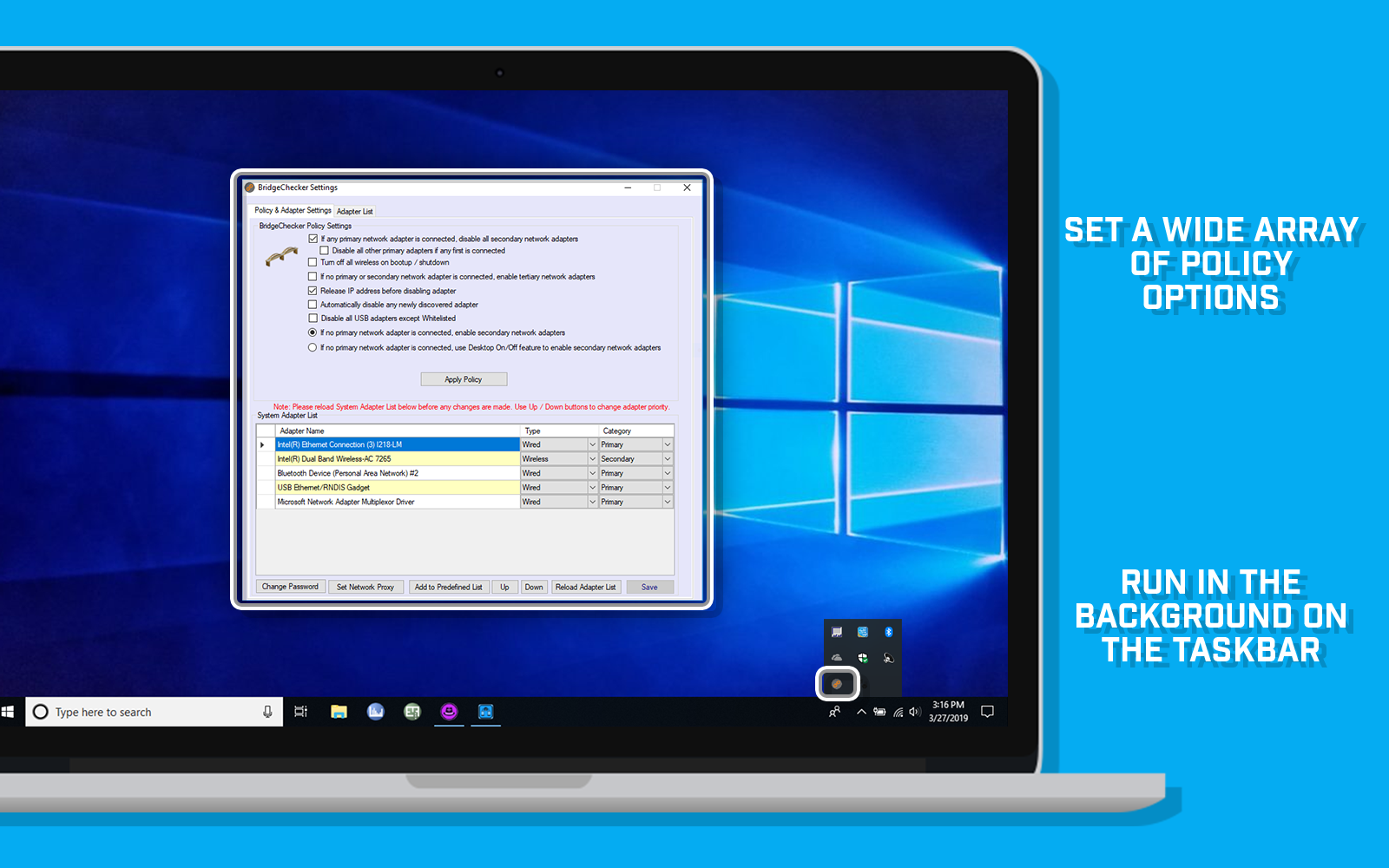
BridgeChecker is a WiFi auto switch utility for Windows and Mac OS that can automatically disable/enable wireless interfaces. Whenever your computer is connected to an Ethernet port and the link state is good, the utility can automatically turn off the IEEE 802.11 wireless network interface. This conserves IP address allocation, reduces security risks, resolves dual interface routing issues, and prolongs battery life.
BridgeChecker allows users to easily disable their wireless network connection when they are connected to a wired network. This can be incredibly useful in a variety of different situations, and can help users to avoid potential security risks, save on battery life, and improve their overall network performance.
One common use case for BridgeChecker is disabling the wireless card when connected to a local area network (LAN) via an Ethernet cable. This is especially useful for business users, who often need to connect to a secure corporate network in order to access important files and applications. By disabling the wireless card, users can ensure that their connection is secure and that they are not at risk of having their data intercepted by hackers or other malicious actors when using open / guest WiFi networks.
BridgeChecker also allows users to enable only one network adapter at a time. This is useful for preventing multiple simultaneous network connections, which can cause conflicts and slow down network performance. By enabling only one network adapter at a time, users can ensure that their network is running smoothly and efficiently.
One of the key features of BridgeChecker is its ability to automatically disable the wireless card when connected to a LAN. This can be incredibly useful for users who frequently switch between wireless and wired networks, as it ensures that the wireless card is only enabled when it is actually needed. By automatically disabling the wireless card, users can save on battery life and improve their overall network performance.
BridgeChecker also allows users to prevent multiple simultaneous network connections. This is useful for preventing bridged networks, which can cause conflicts and slow down network performance. By preventing multiple simultaneous network connections, users can ensure that their network is running smoothly and efficiently.
In addition to these benefits, BridgeChecker can also help users to prevent wireless intrusion by eliminating dual homed devices. By disabling the WLAN on a LAN connection, users can ensure that their network is secure and that they are not at risk of having their data intercepted by hackers or other malicious actors.
Overall, BridgeChecker is a versatile and powerful tool that allows users to easily disable their wireless network connection when they are connected to a wired network. Whether you are a business user looking to improve your network security, or a home user looking to save on battery life and improve network performance, BridgeChecker has something to offer.
NEW: BridgeChecker For Windows Features
- New Feature: Install parameter added for whitelisting specific adapters
BridgeChecker For Windows Features
- Automatically detect wired and wireless adapters for enabling and disabling
- Default operation mode after install will disable wireless if wired connected
- Custom NIC selection for automatic enable/disable feature
- Allow Windows 7 standard user account to enable/disable adapters using Desktop shortcut
- Manual interface enable/disable mode using desktop shortcut
- Interface detection based on Windows hardware device name
- Hide notification area icon (sometimes referred to as system tray icon)
- Software will run as a service to bypass Windows UAC issues
- Flexible licensing options (personal/non-commercial and company/commercial)
- Deploy software and configuration settings using MSI file and options
- Admin password to change configuration
- Option to whitelist adapters (e.g., virtual adapters, VPN adapters, VMware adapters)
- Support for 32 bit and 64 bit Operating Systems
- Disable adapters on PC shutdown / boot up
- Runs in the background with no user input needed
BridgeChecker for Mac OS Features
- Default operation mode after install will disable wireless if wired connected
- Load on Startup
- Enable wireless if wired not connected
- Disable USB connected personal hotspot
- Interface Options:
- Do nothing
- Disable wireless if wired is connected
- Disconnect wireless if wired is connected
- Password protected to exit program
- Runs in the background with no user input needed
- From Menu Bar - View Currently Connected Interface Information
- Name, Mac Address, IP, etc...
Desktops/Laptops
Mac OS X 10.6 or later
Windows 7, 8, 10, and Windows 11 (all versions require Microsoft .NET Framework 4.5)
Recommended Usage Scenarios
The program can be used in the following scenarios:
- Disable wireless card when connected to LAN via Ethernet
- Disable connected wireless USB Adapters when connected to LAN via Ethernet
- Enable only one network adapter at a time
- Automatically disable wireless card when connected to LAN
- Disable wireless when Ethernet cable plugged in
- Disable Wireless adapter automatically when there is a LAN
- Automatically turn off wireless
- Disable wireless when hard wired
- Prevent multiple Simultaneous Network Connections
- Disable wireless when LAN is connected
- Prevent wireless intrusion by eliminating dual homed devices
- Disable WLAN on LAN connection
- Turn off Wireless on laptop
- Turn off wireless when LAN connect
- Disable wireless when on physical network (LAN)
- Prevent bridged networks
- Disable wireless on Ethernet
- Enable/disable wireless automatically
- Disable wireless when cable connected
- Disable WiFi when connected to a wired physical network
- Swapping between wireless and wired networking
- How to auto disable wireless on wired/LAN connect
- Wireless automatically turn off when wired
- Auto switch network connection
- How to auto-switch wireless and lan on Windows 7, Windows 8, Windows 10, and Windows 11